
Tech Returners
CSS - Cascading Style Sheets

WHAT IS CSS?
- CSS (Cascading Style Sheets) was created by the World Wide Web Consortium (W3C) to solve the
problem of formatting and styling a document.
- CSS is used to define styles for your web pages, including the design, layout and variations
in display for different devices and screen sizes.
- This allows HTML to do its job - defining the content of a document.
- Examples of CSS designs…
LINKING YOUR CSS AND HTML CODE
- Put the css inline in the html
- Put the css in a <style></style> section in the <head>
- Link to a separate css file in the <head>
- With an external stylesheet file, you can change the look of an entire website by changing just
one file!
- Demo - linking css file
- By separating these CSS rules into their own file you:
- Reduce repetition in your code
- Reduce the amount of information that has to be sent to the browser for each page
If the CSS file applies to the whole site, it only needs to be sent to the visitor once.
- Reduce repetition in your code
- Reduce the amount of information that has to be sent to the browser for each page
If the CSS file applies to the whole site, it only needs to be sent to the visitor once.
- Task 1
- Create a style.css file and create a link to it in your index.html
- Write some CSS in the file to check it is linked
- Create a style.css file and create a link to it in your index.html
- Write some CSS in the file to check it is linked
RULE SET
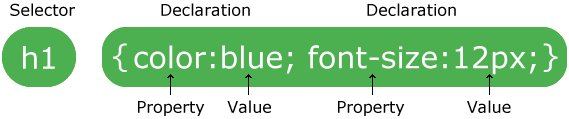
Read more about the syntax use to set CSS rules here:
https://www.w3schools.com/css/css_syntax.asp
MORE ABOUT THE HTML <LINK> TAG
- Absolute links - external links include the complete url to the resource you’re linking to.
Absolute links start with either http:// or https://.
- Document-relative links - contain the path to the resource relative to the file where the link
is written. Document-relative links don’t begin with /:
- Add an image using both styles of linking
Absolute links start with either http:// or https://.
ADDING STYLE VIA AN EXTERNAL STYLESHEET
ID’S AND CLASS SELECTORS
                        <h2 id="products_title">Our scrumptious puddings</h2>

<ul id="products_list">

    <li class="product_item">Black Forest Gateaux</li>

    <li class="product_item">Raspberry

    <li class="product_item">Lemon Swirl Cheesecake</li>

    <li class="product_item">Sticky Toffee Pudding</li>

    <li class="product_item">Death-by-Chocolate Cake</li>

</ul>
<ul id="products_list">
<li class="product_item">Black Forest Gateaux</li>
<li class="product_item">Raspberry
<li class="product_item">Lemon Swirl Cheesecake</li>
<li class="product_item">Sticky Toffee Pudding</li>
<li class="product_item">Death-by-Chocolate Cake</li>
</ul>